
windows:powershell:superscript
Table des matières

SUPER SCRIPT PowerShell Tools
Présentation
Code Sources
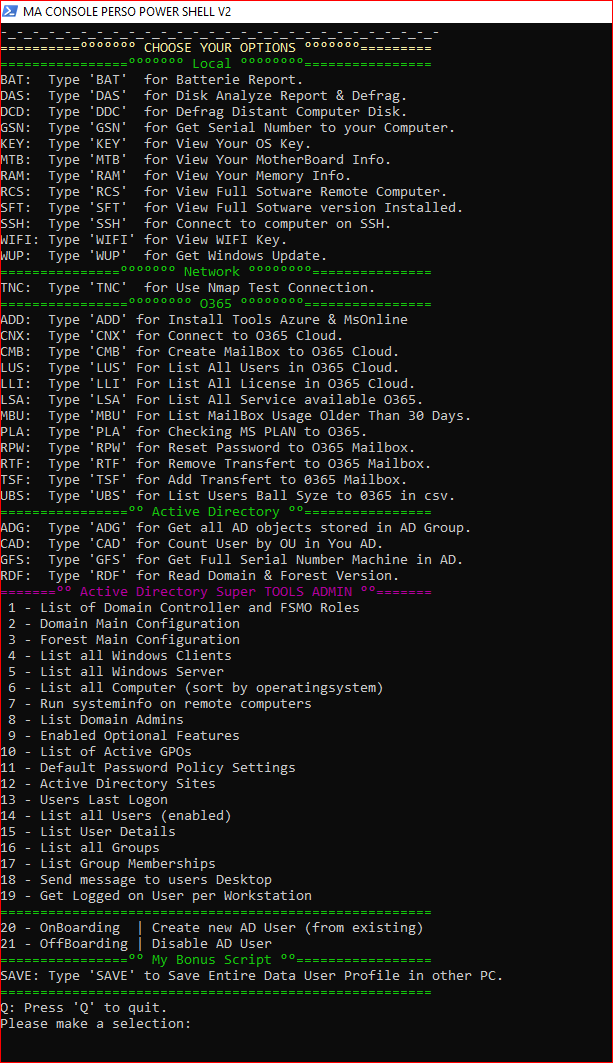
#Modification du Prompt de ma console function prompt { Write-Host (’PS ’ + $(Get-Location) + $(get-date -DisplayHint time) +’>’) ` -NoNewLine -ForegroundColor Cyan ’ ’ } #Modificationde la couleur de fond $host.ui.RawUI.BackGroundColor = ’black’ # Couleur du fond #Modification du titre de ma console $host.ui.RawUI.WindowTitle = ’MA CONSOLE PERSO POWER SHELL V2’ #Rôle utilisateur $UserType = ’Utilisateur’ $CurrentUser =[System.Security.Principal.WindowsIdentity]::GetCurrent() $principal = New-Object System.Security.principal.windowsprincipal($CurrentUser) if ($principal.IsInRole(’Administrateur’)) { $UserType = ’Administrateur’ } #Obtention Info Pc $RAM = (Get-WmiObject -Class Win32_ComputerSystem).TotalPhysicalMemory $Fabricant = (Get-WmiObject -Class Win32_ComputerSystem).Manufacturer $Model = (Get-WmiObject -Class Win32_ComputerSystem).model Write-Host Write-Host Write-Host "Your Local PC Information" -ForegroundColor Cyan Write-Host Write-Host ’+--------------------------------------------------------+’ Write-Host "+- Bonjour $($CurrentUser.Name) -+" Write-Host "+- Connecté en mode $UserType -+" write-Host "+- Nous somme le : $(get-Date) -+" write-Host "+- Policy PS : $(Get-ExecutionPolicy) -+" write-Host "+- Quantité de mémoire Ram : $RAM Octet -+" write-Host "+- Fabricant : $Fabricant -+" write-Host "+- Model : $Model -+" Write-Host ’+--------------------------------------------------------+’ Write-Host Write-Host " Loading Please Wait 5s ... " -ForegroundColor Cyan #Pause de 5 seconde sleep 5 #Fonction Menu $line='=========================================================' $line2='________________________________________________________' function Show-Menu { param ( [string]$Title = 'My Tools' ) cls write-Host " " write-Host " For Proper Operation Please Make Sure POWERSHELL RUN as Administrator Right" -ForegroundColor Red Write-Host " " Write-Host "===============°°°°°°° $Title °°°°°°°===============" -ForegroundColor DarkGreen Write-Host "°°°°°°°°°°°°°°°°° Powered By Me °°°°°°°°°°°°°°°°°°°°" write-Host " " write-Host " If you use AD TOOL make you sure add-ons is installed " -ForegroundColor Red Write-Host " or install it with the Menu below" -ForegroundColor Red Write-Host "-_-_-_-_-_-_-_-_-_-_-_-_-_-_-_-_-_-_-_-_-_-_-_-_-_-_-_-" Write-Host "How to Use My Powershell Tools: " -ForegroundColor Gray write-Host "Choose your option in select Menu," -ForegroundColor Gray Write-Host "when you find your desired option." -ForegroundColor Gray write-Host "Type simply XXX code to execute them and enjoy ;o)" -ForegroundColor Gray Write-Host "-_-_-_-_-_-_-_-_-_-_-_-_-_-_-_-_-_-_-_-_-_-_-_-_-_-_-_-" Write-Host "==========°°°°°°° CHOOSE YOUR OPTIONS °°°°°°°=========" -ForegroundColor Yellow Write-Host "================°°°°°°° Local °°°°°°°°================" -ForegroundColor Green Write-Host "BAT: Type 'BAT' for Batterie Report." Write-Host "DAS: Type 'DAS' for Disk Analyze Report & Defrag." Write-Host "DCD: Type 'DDC' for Defrag Distant Computer Disk." Write-Host "GSN: Type 'GSN' for Get Serial Number to your Computer." Write-Host "KEY: Type 'KEY' for View Your OS Key." Write-Host "MTB: Type 'MTB' for View Your MotherBoard Info." Write-Host "RAM: Type 'RAM' for View Your Memory Info." Write-Host "RCS: Type 'RCS' for View Full Sotware Remote Computer." Write-Host "SFT: Type 'SFT' for View Full Sotware version Installed." Write-Host "SSH: Type 'SSH' for Connect to computer on SSH." Write-Host "WIFI: Type 'WIFI' for View WIFI Key." Write-Host "WUP: Type 'WUP' for Get Windows Update." Write-Host "===============°°°°°°° Network °°°°°°°°===============" -ForegroundColor Green Write-Host "TNC: Type 'TNC' for Use Nmap Test Connection." Write-Host "================°°°°°°°° O365 °°°°°°°°================" -ForegroundColor Green Write-Host "ADD: Type 'ADD' for Install Tools Azure & MsOnline" Write-Host "CNX: Type 'CNX' for Connect to O365 Cloud." Write-Host "CMB: Type 'CMB' for Create MailBox to O365 Cloud." Write-Host "LUS: Type 'LUS' For List All Users in O365 Cloud." Write-Host "LLI: Type 'LLI' For List All License in O365 Cloud." Write-Host "LSA: Type 'LSA' For List All Service available O365." Write-Host "MBU: Type 'MBU' For List MailBox Usage Older Than 30 Days." Write-Host "PLA: Type 'PLA' for Checking MS PLAN to O365." Write-Host "RPW: Type 'RPW' for Reset Password to O365 Mailbox." Write-Host "RTF: Type 'RTF' for Remove Transfert to O365 Mailbox." Write-Host "TSF: Type 'TSF' for Add Transfert to 0365 Mailbox." Write-Host "UBS: Type 'UBS' for List Users Ball Syze to 0365 in csv." Write-Host "================°° Active Directory °°================" -ForegroundColor Green Write-Host "ADG: Type 'ADG' for Get all AD objects stored in AD Group." Write-Host "CAD: Type 'CAD' for Count User by OU in You AD." Write-Host "GFS: Type 'GFS' for Get Full Serial Number Machine in AD." Write-Host "RDF: Type 'RDF' for Read Domain & Forest Version." Write-Host "=======°° Active Directory Super TOOLS ADMIN °°=======" -ForegroundColor Magenta Write-Host ' 1 - List of Domain Controller and FSMO Roles' Write-Host ' 2 - Domain Main Configuration' Write-Host ' 3 - Forest Main Configuration' Write-Host ' 4 - List all Windows Clients' Write-Host ' 5 - List all Windows Server' Write-Host ' 6 - List all Computer (sort by operatingsystem)' Write-Host ' 7 - Run systeminfo on remote computers' Write-Host ' 8 - List Domain Admins' Write-Host ' 9 - Enabled Optional Features' Write-Host '10 - List of Active GPOs' Write-Host '11 - Default Password Policy Settings' Write-Host '12 - Active Directory Sites' Write-Host '13 - Users Last Logon' Write-Host '14 - List all Users (enabled)' Write-Host '15 - List User Details' Write-Host '16 - List all Groups' Write-Host '17 - List Group Memberships' Write-Host '18 - Send message to users Desktop' Write-Host '19 - Get Logged on User per Workstation' Write-Host "======================================================" -ForegroundColor Green Write-Host '20 - OnBoarding | Create new AD User (from existing)' Write-Host '21 - OffBoarding | Disable AD User' Write-Host "================°° My Bonus Script °°=================" -ForegroundColor Green Write-Host "SAVE: Type 'SAVE' to Save Entire Data User Profile in other PC." Write-Host "======================================================" -ForegroundColor Green Write-Host "Q: Press 'Q' to quit." } do { Show-Menu $input = Read-Host "Please make a selection" switch ($input) { 'RDF' { cls Write-Host " Lecture en cours... " -ForegroundColor Green Write-Host "La version du Domaine est:" -ForegroundColor Yellow (Get-ADDomain).DomainMode Write-Host "Le niveau de Forêt est:" -ForegroundColor Yellow (Get-ADForest).ForestMode } 'ADD' { cls Write-Host " Please Wait ... " -ForegroundColor Green Install-Module -Name AzureAD sleep 2 Install-Module -Name MSOnline } 'CNX' { cls write-Host " °°°°°°>> Connexion to Exchange °°°°°°°°>>" Import-module MSonline $LiveCred = Get-Credential Connect-MsolService -Credential $LiveCred #Set-ItemProperty 'HKLM:\SOFTWARE\Microsoft\PowerShell\1\ShellIds' ConsolePrompting $false $Session = New-PSSession -ConfigurationName Microsoft.Exchange -ConnectionUri https://ps.outlook.com/powershell/ -Credential $LiveCred -Authentication Basic -AllowRedirection Import-PSSession $Session } 'BAT' { cls Write-Host " Analyse en cours... " -ForegroundColor Green powercfg /batteryreport } 'DAS' { cls $Volume = Read-Host "Volume to Analyze ex: C or D" Optimize-Volume $Volume –Analyze -verbose $Choix = read-host "Do you want to defrag the volume " $Volume "? Y / N " if ($Choix -eq 'Y') {Optimize-Volume $Volume -Verbose} } 'DDC' { cls $COMPUTERNAME = Read-Host "Computer Name ex: DC4" $Volume = Read-Host "Volume to Analyze ex: C or D" Optimize-Volume $Volume –Analyze –Cimsession $COMPUTERNAME -verbose $Choix = read-host "Do you want to defrag the volume " $Volume " on " $COMPUTERNAME "? Y / N " if ($Choix -eq 'Y') {Optimize-Volume d -Verbose -CimSession $COMPUTERNAME} } 'GSN' { cls Write-Host " Checking Serial please Wait... " -ForegroundColor Green Sleep 1 Get-CimInstance Win32_Bios | Select-Object SerialNumber } 'KEY' { cls Write-Host " Checking Key please Wait... " -ForegroundColor Green wmic path softwarelicensingservice get OA3xOriginalProductKey } 'MTB' { cls Write-Host " Checking MotherBoard please Wait... " -ForegroundColor Green Sleep 1 Get-WmiObject Win32_BaseBoard } 'RAM' { cls Write-Host " Checking Memory please Wait... " -ForegroundColor Green Sleep 1 Get-CimInstance win32_physicalmemory | Format-Table Manufacturer,Banklabel,Configuredclockspeed,Devicelocator,Capacity,Serialnumber -autosize } 'RCS' { cls $COMPUTERNAME = Read-Host "Remote Computer Name ex: SRVDATA" Write-Host " Checking Software please Wait... " -ForegroundColor Green Get-CimInstance -ComputerName $COMPUTERNAME -ClassName win32_product -ErrorAction SilentlyContinue| Select-Object PSComputerName, Name, PackageName, InstallDate | Out-GridView } 'SFT' { cls Write-Host " Checking Software please Wait... " -ForegroundColor Green sleep 4 Get-ItemProperty HKLM:\Software\Wow6432Node\Microsoft\Windows\CurrentVersion\Uninstall\* | Select-Object DisplayName, DisplayVersion, Publisher, InstallDate | Format-Table –AutoSize } 'SSH' { cls $COMPUTERNAME = Read-Host "Remote Computer Name ex: SRVDATA" New-SSHSession -ComputerName $COMPUTERNAME } 'WIFI' { cls $SSID = Read-Host "Type your SSID" Write-Host " Read your Security Key... " -ForegroundColor Green netsh wlan show profile $SSID key=clear } 'ADG' { cls Param( [Parameter(Mandatory=$true)] [string]$LogFilePath ) # Setting up log file and Groups variables Write-Host Write-Host Write-Host "Setting up initial variables ... " -NoNewLine $LogTime = Get-Date -Format "yyyyMMdd_hhmmss - " $LogFileName = "AD Users by Group.log" $LogFile = $LogFilePath + $LogTime + $LogFileName $Groups = Get-ADGroup -Filter "*" Write-Host "Ok !" -ForeGroundColor Green Write-Host Write-Host Write-Host "Getting all AD Users by AD Groups ..." Write-Host # Getting all AD Groups and writing them in a file and on the console foreach ($Group in $Groups) { Write-Host Write-Host " Group : $($Group.Name)" Write-Output "Group : $($Group.Name)" | Out-File $LogFile -Append # Getting all Members of an AD Group and writing them in a file and on the console $Members = Get-ADGroupMember $($Group.Name) Foreach($Member in $Members) { if($Member.ObjectClass -eq "user") { # Getting account status (Enable ou Disable) $user = Get-ADUser $Member -Properties enabled if ($user.enabled -eq $True) { Write-Output " * User : $($user.Name) --> Enable" | Out-File $LogFile -Append Write-Host " * User : $($user.Name) --> Enable" } else { Write-Output " * User : $($user.Name) --> Disable" | Out-File $LogFile -Append Write-Host " * User : $($user.Name) --> Disable" } } } # /Foreach Members Write-Host Write-Output "" | Out-File $LogFile -Append } # /Foreach Groups Write-Host Write-Host Write-Host "Done !" -ForeGroundColor Green Write-Host } 'CAD' { cls Write-Host "Please Wait Counting User by OU... " -ForegroundColor Green $TAB=@() Get-ADOrganizationalUnit -Filter * | %{ $OU = New-Object System.Object $OU | Add-Member -type NoteProperty -name OU -value $_.DistinguishedName $OU | Add-Member -type NoteProperty -name NBUser -value (@(Get-ADUser -Filter * -SearchBase $_.DistinguishedName -SearchScope 1 ).count) $TAB+=$OU } $TAB | Out-File -FilePath ADCount.txt Write-Host "Please check your file named ADCount.txt into location to set PowerShell" -ForegroundColor Yellow } 'GFS' { cls Write-Host " Checking Serial on AD Computer please Wait... " -ForegroundColor Green (Get-ADComputer -Filter *).Name | Foreach-Object {Get-CimInstance Win32_Bios -ComputerName $_ -ErrorAction SilentlyContinue | Select-Object @{n='Computername'; e={$_.PSComputerName}},SerialNumber} } 'WUP' { cls Write-Host "Please Wait during install Module WsUpdate..." -ForeGroundColor Green Write-Host "If not installed your pc will be restarted " -ForeGroundColor Yellow # Installation du module Windows update powershell Install-Module -Name PSWindowsUpdate # Vérification des mises à jour Windows + installation Get-WindowsUpdate -AcceptAll -Install Write-Host "Your pc asked for updates Now!!" -ForeGroundColor Yellow } 'TNC' { cls $Site = read-host "Site ex. www.sfr.fr" $Port = Read-Host "Port ex: 443 " Test-NetConnection www.sid-500.com -Port $Port } 'RTF' { cls $Login = read-host "Alias ex. pnom" $Login = $Login.ToLower() $Choix = read-host "Voulez-vous enlever le transfert du compte " $Login "? O pour Oui" if ($Choix -eq 'O') { # Enleve le transfert Set-Mailbox $Login -DeliverToMailboxAndForward $false -ForwardingSmtpAddress $Null Get-Mailbox $Login | ft alias,ForwardingSmtpAddress -auto } } 'TSF' { cls Write-Host "REQUIREMENTS: Please connect to 0365 before." -ForegroundColor Yellow Write-Host "No accentuated character" -ForegroundColor Yellow $Login = read-host "Aliases ex. s.name or sname transfer box name" $Transfert = read-host "to emailadress@domaine.net" $Courriel = read-host "Leave a copy Y / N ?" $Login = $Login.ToLower() $Transfert = $Transfert.ToLower() $Choix = read-host "Do you want to add the transfer to "$Transfert" du compte "$Login"? Y for YES" if ($Choix -eq 'Y') { # ajoute le transfert # -DeliverToMailboxAndForward $true le mail est laissé dans la BAL if ($Courriel -eq 'Y') {Set-Mailbox $Login -DeliverToMailboxAndForward $true -ForwardingSmtpAddress $Transfert} else {Set-Mailbox $Login -DeliverToMailboxAndForward $false -ForwardingSmtpAddress $Transfert} Get-Mailbox $Login | ft alias,ForwardingSmtpAddress -auto } } 'UBS' { cls Write-Host "Please check your file named Etat des tailles.csv into location to set PowerShell" -ForegroundColor Yellow Get-Mailbox -ResultSize Unlimited | Get-MailboxStatistics | Select DisplayName,@{name="TotalItemSize (MB)";expression={[math]::Round((($_.TotalItemSize.Value.ToString()).Split("(")[1].Split(" ")[0].Replace(",","")/1MB),2)}},@{name="TotalDeletedItemSize (MB)";expression={[math]::Round((($_.TotalDeletedItemSize.Value.ToString()).Split("(")[1].Split(" ")[0].Replace(",","")/1MB),2)}},ItemCount,DeletedItemCount | Sort "TotalItemSize (MB)" -Descending | Export-CSV "Etat des tailles.csv" -NoTypeInformation } 'PLA' { cls Get-MailboxPlan | Format-List DisplayName,IsDefault,Max*Size,IssueWarningQuota,Prohibit*Quota,RetainDeletedItemsFor,RetentionPolicy,RoleAssignmentPolicy } 'RPW' { cls $UPN = read-host "pnom@domaine.xxx or p.nom3@domaine.xxx" $Password = Read-Host "PleaseInput New Password" $ChangePWD = read-host "Do you wantchange password at first login Y / N ?" if ($ChangePWD -eq 'Y') {Set-MsolUserPassword -UserPrincipalName $UPN -NewPassword "$Password" -ForceChangePassword $True} else {Set-MsolUserPassword -UserPrincipalName $UPN -NewPassword "$Password" -ForceChangePassword $False} } 'CMB' { cls Write-Host "Creation Script MailBox O365 By Sylvain VALLDAURA " -ForegroundColor Gray Write-Host Write-Host "if you don't know, press enter to go to the next one" -ForegroundColor Red Write-Host Write-Host "Let's Go!!" Write-Host write-Host "Type Full Name ex: Patrick BALKANI" $DisplayName = Read-host "Set Full Name" $UserPrincipalName = Read-host "Set FQDN name ex: pnom@domaine.xxx or p.nom@domaine.xxx" $City = Read-host "Set City ex: Ville" $PostalCode = Read-Host "Set Postal Code ex: 69800" $StreetAddress = Read-Host "Set Address ex: Rue des Lilas" $Country = Read-host "Set Country ex: Pays" $Phone = Read-host "Set Phone Number ex: +33 X XX XX XX XX" $Mobile = Read-Host "Set MobilePhone Number ex: +33 X XX XX XX XX" $Department = Read-Host "Set Department ex: IT or CQ" $JobTitle = Read-Host "Set Job Title ex: Director of IT Service" $UsageLocation = Read-Host "Set UsageLocation ex: FR or US" #$Company = Read-host "Set Compagny Name" $FirstName = Read-host "Set FirstName ex: Prenom" $LastName = Read-host "Set Name ex: Nom" $Password = Read-host "Set Password ex: My Password" $CompanyNameService0365 = Read-Host "Set CompanyName ex Sanofi" $ExchangPLAN = Read-Host "Set Exchange PLAN ex: ENTERPRISEPACK " New-MsolUser -DisplayName $DisplayName -UserPrincipalName $UserPrincipalName -City $City -Country $Country -PostalCode $PostalCode -StreetAddress $StreetAddress -Phone $Phone -Mobile $Mobile -Department $Department -Title $JobTitle -FirstName $FirstName -LastName $LastName -ForceChangePassword $false -LicenseAssignment ${CompanyNameService0365}:${ExchangPLAN} -PasswordNeverExpires $true -Password $Password -StrongPasswordRequired $false -UsageLocation $UsageLocation Start-Sleep -Seconds 5 #OPTION # Récupération du champ name pour l'attribuer a la compagnie #$name = Get-Maibox $UserPrincipalName #Start-Sleep -Seconds 2 # Changement de la zone de domaine Live ID #Import-Csv .\comptes.txt | ForEach-Object -Process {Set-MsolUserPrincipalName -UserPrincipalName $_.UserPrincipalName -NewUserPrincipalName $_.NewUserPrincipalName # Modification du champ compagnie #Set-User $name.Name -Company $Company # Exemples # Reset mot de passe #Set-MsolUserPassword -UserPrincipalName pnom3@domaine.xxx -ForceChangePassword $False # Reset avec saisie du mot de passe #Set-MsolUserPassword -UserPrincipalName pnom3@domaine.xxx -NewPassword "124soleil!" -ForceChangePassword $False # Affichage du résultat Write-Host "Le compte est crée " $name } 'LUS' { cls Get-MsolUser | Select DisplayName, City, Department, ObjectID } 'LLI' { cls Write-Host -ForegroundColor Green 'Get Licences consumption Waiting... ' Get-MsolAccountSku } 'LSA'{ cls Write-Host -ForegroundColor Green 'Get All Services Available Waiting... ' Get-MsolAccountSku | select -ExpandProperty ServiceStatus } 'MBU'{ cls Write-Host -ForegroundColor Green 'Get MailBox Usage Waiting... ' Get-Mailbox –RecipientType 'UserMailbox' | Get-MailboxStatistics | Sort-Object LastLogonTime | Where {$_.LastLogonTime –lt ([DateTime]::Now).AddDays(-30) } | Format-Table DisplayName, LastLogonTime } 'SAVE'{ cls Write-Host "Please Make sure the user has logged in to the new PC before Executed this Script" -ForegroundColor Red Write-Host "The log file will create or run the script with the username with .txt extension" -ForegroundColor Yellow write-Host Write-Host "Please Make Sure your DNS is up to date for using Machine Name if not use Ip." -ForegroundColor Green # Migration des données utilisateurs $AncienneMachine = Read-host "Nom ou Ip de l'ancienne machine" $UserName = Read-host "Nom d'utilisateur ex:pnom" $NouvelleMachine = Read-host "Nom ou Ip de la Nouvelle machine" #Montage du Disk Distant depuis Ancien pc Write-host "Mappage du lecteur depuis $AncienneMachine ok " -foregroundcolor Green $obj = New-Object -com Wscript.Network $obj.MapNetworkDrive("M:","\\$AncienneMachine\c$\Users\$Username") #Copie des données de l'ancien pc vers le nouveau Write-Host "Execution de Robocopy" -ForegroundColor Yellow Write-Host "Copie du Bureau depuis $AncienneMachine" -ForegroundColor Yellow Robocopy M:\Desktop\ /E /X /MIR \\$NouvelleMachine\c$\Users\$Username\Desktop\ /R:3 /W:5 /ETA /TEE /NP /LOG:$UserName.txt Timeout 2 Write-Host "Copie des Documents depuis $AncienneMachine" -ForegroundColor Yellow Robocopy M:\Documents\ /E /X /MIR \\$NouvelleMachine\c$\Users\$Username\Documents\ /R:3 /W:5 /ETA /TEE /NP /LOG+:$UserName.txt Timeout 2 Write-Host "Copie des Favoris depuis $AncienneMachine" -ForegroundColor Yellow Robocopy M:\Favorites\ /E /X /MIR \\$NouvelleMachine\c$\Users\$Username\Favorites\ /R:3 /W:5 /ETA /TEE /NP /LOG+:$UserName.txt Timeout 2 Write-Host "Copie des Signatures Mails depuis $AncienneMachine" -ForegroundColor Yellow Robocopy M:\AppData\Roaming\Microsoft\Signatures\ /E /X /MIR \\$NouvelleMachine\c$\Users\$Username\AppData\Roaming\Microsoft\Signatures\ /R:3 /W:5 /ETA /TEE /NP /LOG+:$UserName.txt Timeout 2 Write-Host "Copie du Cache Mails NK2 depuis $AncienneMachine" -ForegroundColor Yellow Xcopy M:\AppData\Roaming\Microsoft\Outlook\*.NK2 /Z \\$NouvelleMachine\c$\Users\$Username\AppData\Roaming\Microsoft\Outlook\ Timeout 2 Write-Host "Copie des Model Quickpart "Templates" depuis $AncienneMachine" -ForegroundColor Yellow Xcopy M:\AppData\Roaming\Microsoft\Templates /Z \\$NouvelleMachine\c$\Users\$Username\AppData\Roaming\Microsoft\Templates\ Timeout 2 Write-Host "Copie des Contacts depuis $AncienneMachine" -ForegroundColor Yellow Robocopy M:\Contacts\ /E /X /MIR \\$NouvelleMachine\c$\Users\$Username\Contacts\ /R:3 /W:5 /ETA /TEE /NP /LOG+:$UserName.txt Timeout 2 Write-Host "Copie des Liens depuis $AncienneMachine" -ForegroundColor Yellow Robocopy M:\Links\ /E /X /MIR \\$NouvelleMachine\c$\Users\$Username\Links\ /R:3 /W:5 /ETA /TEE /NP /LOG+:$UserName.txt Timeout 2 Write-Host "Copie de mes Musique depuis $AncienneMachine" -ForegroundColor Yellow Robocopy M:\Music\ /E /X /MIR \\$NouvelleMachine\c$\Users\$Username\Music\ /R:3 /W:5 /ETA /TEE /NP /LOG+:$UserName.txt Timeout 2 Write-Host "Copie de mes Images depuis $AncienneMachine" -ForegroundColor Yellow Robocopy M:\Pictures\ /E /X /MIR \\$NouvelleMachine\c$\Users\$Username\Pictures\ /R:3 /W:5 /ETA /TEE /NP /LOG+:$UserName.txt Timeout 2 Write-Host "Copie de mes Videos depuis $AncienneMachine" -ForegroundColor Yellow Robocopy M:\Videos\ /E /X /MIR \\$NouvelleMachine\c$\Users\$Username\Videos\ /R:3 /W:5 /ETA /TEE /NP /LOG+:$UserName.txt Timeout 2 Write-Host "Copie de mes Downloads depuis $AncienneMachine" -ForegroundColor Yellow Robocopy M:\Downloads\ /E /X /MIR \\$NouvelleMachine\c$\Users\$Username\Downloads\ /R:3 /W:5 /ETA /TEE /NP /LOG+:$UserName.txt Timeout 1 #Fin du transfert Write-host "Fin du transfert" -foregroundcolor Green #Démontage du Disk Distant depuis Ancien pc Write-host "Suppression du lecteur mappé depuis $AncienneMachine démonter = ok " -foregroundcolor Green net use /delete M: Write-host "Fermeture de PowerShell Console" -foregroundcolor Green Timeout 5 Exit } 1 { $dc=Get-ADDomainController -Filter * $dccount=$dc | Measure-Object | Select-Object -ExpandProperty count Write-Host -ForegroundColor Green "Active Directory Domain Controller ($env:userdnsdomain)" $line2 $dc | Format-Table Name,Ipv4Address,OperatingSystem,Site,IsGlobalCatalog,OperationMasterRoles -autosize -wrap Write-Host 'Total Number: '$dccount"" } 2 { Write-Host -ForegroundColor Green 'DOMAIN Configuration' $line2 Get-ADDomain | Format-List DNSRoot, DomainMode, ComputersContainer, DeletedObjectsContainer, UsersContainer } 3 { Write-Host -ForegroundColor Green 'FOREST Configuration' $line2 Get-ADForest | Format-List RootDomain, ForestMode, Domains, Sites } 4 { $client=Get-ADComputer -Filter {operatingsystem -notlike '*server*'} -Properties Name,Operatingsystem,OperatingSystemVersion,IPv4Address $ccount=$client | Measure-Object | Select-Object -ExpandProperty count Write-Host -ForegroundColor Green "Windows Clients $env:userdnsdomain" $line2 Write-Output $client | Sort-Object Operatingsystem | Format-Table Name,Operatingsystem,OperatingSystemVersion,IPv4Address -AutoSize Write-Host 'Total: '$ccount"" } 5 { $server=Get-ADComputer -Filter {operatingsystem -like '*server*'} -Properties Name,Operatingsystem,OperatingSystemVersion,IPv4Address $scount=$server | Measure-Object | Select-Object -ExpandProperty count Write-Host -ForegroundColor Green "Windows Server ($env:userdnsdomain)" $line2 Write-Output $server | Sort-Object Operatingsystem | Format-Table Name,Operatingsystem,OperatingSystemVersion,IPv4Address Write-Host 'Total: '$scount"" } 6 { $all=Get-ADComputer -Filter * -Properties Name,Operatingsystem,OperatingSystemVersion,IPv4Address $acount=$all | Measure-Object | Select-Object -ExpandProperty count Write-Host -ForegroundColor Green "All Computer ($env:userdnsdomain)" $line2 Write-Output $all | Select-Object Name,Operatingsystem,OperatingSystemVersion,IPv4Address | Sort-Object OperatingSystem | Format-Table -GroupBy OperatingSystem Write-Host 'Total: '$acount"" } 7 { do { Write-Host '' Write-Host 'Select the scope:' -ForegroundColor Green Write-Host '' Write-Host '1 - Localhost' Write-Host '2 - Remote Computer (Enter Computername)' Write-Host '3 - All Windows Server' Write-Host '4 - All Windows Computer' Write-Host '0 - Quit' Write-Host '' $scopesi=Read-Host 'Select' $header='Host Name','OS','Version','Manufacturer','Configuration','Build Type','Registered Owner','Registered Organization','Product ID','Install Date','Boot Time','System Manufacturer','Model','Type','Processor','Bios','Windows Directory','System Directory','Boot Device','Language','Keyboard','Time Zone','Total Physical Memory','Available Physical Memory','Virtual Memory','Virtual Memory Available','Virtual Memory in Use','Page File','Domain','Logon Server','Hotfix','Network Card','Hyper-V' switch ($scopesi) { 1 { & "$env:windir\system32\systeminfo.exe" /FO CSV | Select-Object -Skip 1 | ConvertFrom-Csv -Header $header } 2 { Write-Host 'Separate multiple computernames by comma. (example: server01,server02)' Write-Host '' $comps=Read-Host 'Enter computername' $comp=$comps.Split(',') Invoke-Command -ComputerName $comps {systeminfo /FO CSV | Select-Object -Skip 1} -ErrorAction SilentlyContinue | ConvertFrom-Csv -Header $header } 3 { Invoke-Command -ComputerName (Get-ADComputer -Filter {operatingsystem -like '*server*'}).Name {systeminfo /FO CSV | Select-Object -Skip 1} -ErrorAction SilentlyContinue | ConvertFrom-Csv -Header $header } 4 { Invoke-Command -ComputerName (Get-ADComputer -Filter *).Name {systeminfo /FO CSV | Select-Object -Skip 1} -ErrorAction SilentlyContinue | ConvertFrom-Csv -Header $header } } } while ($scopesi -ne '0') } 8 { Write-Host -ForegroundColor Green 'The following users are member of the Domain Admins group:'`n (Get-ADGroupMember 'Admins du domaine').Name } 9 { Write-Host -ForegroundColor Green 'The following optional features are enabled:'`n (Get-ADOptionalFeature -Filter *).Name } 10 { Write-Host -ForegroundColor Green 'The GPOs below are linked to AD Objects:'`n Get-GPO -All | ForEach-Object { If ( $_ | Get-GPOReport -ReportType XML | Select-String '<LinksTo>' ) { Write-Host $_.DisplayName}} } 11 { Write-Host -ForegroundColor Green 'The Default Domain Policy is configured as follows:'`n Get-ADDefaultDomainPasswordPolicy | Format-List ComplexityEnabled, LockoutDuration,LockoutObservationWindow,LockoutThreshold,MaxPasswordAge,MinPasswordAge,MinPasswordLength,PasswordHistoryCount,ReversibleEncryptionEnabled } 12 { Write-Host -ForegroundColor Green 'Active Directory Sites:'`n $GetSite = [System.DirectoryServices.ActiveDirectory.Forest]::GetCurrentForest().Sites $Sites = @() foreach ($Site in $GetSite) { $Sites += New-Object -TypeName PSObject -Property ( @{ 'SiteName' = $site.Name 'SubNets' = $site.Subnets -Join ',' 'Servers' = $Site.Servers -Join ',' } ) } $Sites | Format-Table -AutoSize -Wrap } 13 { do { $userl=Read-Host 'Enter user logon name' Get-ADUser $userl -Properties lastlogondate | Format-Table Givenname,Surname,LastLogonDate $input=Read-Host 'Quit searching users? (Y/N)' } while ($input -eq 'N') } 14 { Get-ADUser -Filter {enabled -eq $true} | Sort-Object Name | Format-Wide Name -Column 4 Read-Host 'Press 0 and Enter to continue' } 15 { do { $userp=Read-Host 'Enter user logon name' Get-ADUser $userp -Properties * | Format-List GivenName,SurName,DistinguishedName,Enabled,EmailAddress,ProfilePath,ScriptPath,MemberOf,LastLogonDate,whencreated $input=Read-Host 'Quit searching users? (Y/N)' } while ($input -eq 'N') } 16 { Get-ADGroup -Filter * | Sort-Object Name | Format-Wide Name -Column 3 } 17 { do { $groupm=Read-Host 'Enter group name' Get-ADGroupMember $groupm | Format-Table Name $input=Read-Host 'Quit searching groups? (Y/N)' } while ($input -eq 'N') } 18 { do { Write-Host '' Write-Host 'To which computers should a message be sent?' -ForegroundColor Green Write-Host '' Write-Host '1 - Localhost' Write-Host '2 - Remote Computer (Enter Computername)' Write-Host '3 - All Windows Server' Write-Host '4 - All Windows Computer' Write-Host '0 - Quit' Write-Host '' $scopemsg=Read-Host 'Select' switch ($scopemsg) { 1 { $msg=Read-Host 'Enter the message that is sent to all users logged on to the computer (LOCALHOST)' msg * "$msg" } 2 { Write-Host 'Separate multiple computernames by comma. (example: server01,server02)' Write-Host '' $comp=Read-Host 'Enter computername' $comps=$comp.Split(',') $msg=Read-Host 'Enter message' Invoke-Command -ComputerName $comps -ScriptBlock {msg * $using:msg} } 3 { Write-Host 'Note that the message will be sent to all servers!' -ForegroundColor Red $msg=Read-Host 'Enter the message that is sent to all users logged on to WINDOWS SERVER operating systems' (Get-ADComputer -Filter {operatingsystem -like '*server*'}).Name | Foreach-Object {Invoke-Command -ComputerName $_ -ScriptBlock {msg * $using:msg} -ErrorAction SilentlyContinue}} }} while ($scopemsg -ne '0') } 19 { $result=@() $cred=Get-Credential $read=Read-Host 'Enter Computer Name' Invoke-Command -ComputerName $read -ScriptBlock {quser} -Credential $cred | Select-Object -Skip 1 | Foreach-Object { $b=$_.trim() -replace '\s+',' ' -replace '>','' -split '\s' If ($b[2] -like 'Disc*') { $array= ([ordered]@{ 'User' = $b[0] 'Computer' = $read 'Date' = $b[4] 'Time' = $b[5] }) Write-Output $array } else { $array= ([ordered]@{ 'User' = $b[0] 'Computer' = $read 'Date' = $b[5] 'Time' = $b[6] }) Write-Output $array } } } 20 { function ad { if (Get-Module -ListAvailable -Name ActiveDirectory) { Import-Module ActiveDirectory } else { '' Write-Host "Operation aborted. No Active Directory Module found. Run this tool on a Domain Controller." -ForegroundColor Red '' throw "Error" }} cls '' Write-Host "This menu item creates a new AD User based on an existing one for the domain $env:userdnsdomain." -ForegroundColor Green '' do { Write-Host 'Enter LOGON NAME of an EXISTING USER to copy (Q to quit)' -ForegroundColor Yellow '' $nameds = Read-Host "LOGON NAME (existing user)" If ($nameds -eq 'Q') {Break} If (dsquery user -samid $nameds) { '' Write-host -ForegroundColor Green "AD User $nameds found!"} elseif ($nameds = "null") { '' Write-Host "User not found. Please try again." -ForegroundColor Red ''} } while ($nameds -eq "null") If ($nameds -eq 'Q') {Break} $name = Get-AdUser -Identity $nameds -Properties * $DN = $name.distinguishedName $OldUser = [ADSI]"LDAP://$DN" $Parent = $OldUser.Parent $OU = [ADSI]$Parent $OUDN = $OU.distinguishedName Write-Host '' Write-Host 'Enter the LOGON NAME of the NEW USER' -ForegroundColor Yellow '' $NewUser = Read-Host "LOGON NAME (new user)" $firstname = Read-Host "First Name" $Lastname = Read-Host "Last Name" $NewName = "$firstname $lastname" $domain = [System.DirectoryServices.ActiveDirectory.Domain]::GetCurrentDomain() $prof = $name.ProfilePath '' Write-Host "Are you sure you want to create user $firstname $lastname with the logon name $newuser and copy properties from $nameds to $newuser (Y/N)" -ForegroundColor Yellow '' $surely=Read-Host "Enter (Y/N)" If ($surely -eq 'y') { New-ADUser -SamAccountName $NewUser -Name $NewName -GivenName $firstname -displayname "$firstname $lastname" -Surname $lastname -Instance $DN -Path "$OUDN" -AccountPassword (Read-Host "Enter Password for $firstname $lastname" -AsSecureString) –userPrincipalName $NewUser@$domain -Company $name.Company -Department $name.Department -Manager $name.Manager -title $name.Title -Office $name.Office -City $name.city -PostalCode $name.postalcode -Country $name.country -Fax $name.fax -State $name.State -StreetAddress $name.StreetAddress -Enabled $true -ProfilePath ($prof -replace $name.SamAccountName, $NewUser) -HomePage $name.wWWHomePage -ScriptPath $name.ScriptPath Set-ADUser -identity $newUser -ChangePasswordAtLogon $true '' Write-Host "Copying Group Memberships, Profile Path, Logon Script and more ..." $groups = (Get-ADUser –Identity $name –Properties MemberOf).MemberOf foreach ($group in $groups) { Add-ADGroupMember -Identity $group -Members $NewUser } '' Write-Host 'The following user has been created by the Active Directory Services Section Tool:' -ForegroundColor Green Get-ADUser $NewUser -Properties * | Format-List GivenName,SurName,CanonicalName,Enabled,ProfilePath,ScriptPath,MemberOf,whencreated } else {Break} } 20 { cls '' Write-Host "This menu item deactivates an AD User in the domain $env:userdnsdomain." -ForegroundColor Yellow '' do { $a=Read-Host 'Enter LOGON NAME of the user to be deactivated (Q to quit)' If ($a -eq 'Q') {Break} If (dsquery user -samid $a) { '' Write-host -foregroundcolor Green "AD User $a found!" } elseif ($a = "null") { '' Write-Host -ForegroundColor Red "AD User not found. Please try again." ''} } while ($a -eq "null") If ($a -eq 'Q') {Break} $det=((Get-ADuser -Identity $a).GivenName + ' ' + (Get-ADUser -Identity $a).SurName) '' Write-Host "User $det will be deactivated. Are you sure? (Y/N)" -ForegroundColor Yellow '' $sure=Read-Host 'Enter (Y/N)' If ($sure -eq 'Y') { Get-ADUser -Identity "$a" | Set-ADUser -Enabled $false '' Write-Host -ForegroundColor Green "User $a has been deactivated." '' $b=Read-Host "Do you want to remove all group memberships from that user ($a)? (Y/N)" If ($b -eq 'Y') { $ADgroups = Get-ADPrincipalGroupMembership -Identity "$a" | where {$_.Name -ne 'Domain Users'} If ($ADgroups -ne $null) {Remove-ADPrincipalGroupMembership -Identity "$a" -MemberOf $ADgroups -Confirm:$false -WarningAction SilentlyContinue -ErrorAction Ignore } } } else {Break} '' Write-Host 'The following user has been deactivated by the Active Directory Services Section Tool:' -ForegroundColor Green Get-ADUser $a -Properties * | Format-List GivenName,SurName,DistinguishedName,Enabled,MemberOf,LastLogonDate,whencreated } 'q' { return } } pause } until ($input -eq 'q')
— sylvain 2020/02/28 13:53
windows/powershell/superscript.txt · Dernière modification : de 127.0.0.1