
tutaux:linux:conky
Table des matières
Conky Widget
Installation
Installer le paquet conky
apt-get install conky-all
Pour avoir le logiciel en mode full option.
Ensuite éditer le fichier de config :
nano /home/user/.conkyrc
Contenu de ma config
conky.config = {
    own_window_type = 'normal',
    own_window_hints = 'undecorated,sticky,below,skip_taskbar,skip_pager',
    own_window_argb_visual = true,
    own_window_argb_value = 50,
    double_buffer = true,
    alignment = 'top_right',
    background = false,
    border_width = 1,
    cpu_avg_samples = 2,
    default_color = 'white',
    default_outline_color = 'white',
    default_shade_color = 'white',
    double_buffer = true,
    draw_borders = false,
    draw_graph_borders = true,
    draw_outline = false,
    draw_shades = false,
    extra_newline = false,
    font = 'DejaVu Sans Mono:size=12',
    gap_x = 60,
    gap_y = 60,
    minimum_height = 5,
    minimum_width = 5,
    net_avg_samples = 2,
    no_buffers = true,
    out_to_console = false,
    out_to_ncurses = false,
    out_to_stderr = false,
    out_to_x = true,
    own_window = true,
    own_window_class = 'Conky',
    own_window_type = 'desktop',
    show_graph_range = false,
    show_graph_scale = false,
    stippled_borders = 0,
    update_interval = 1.0,
    uppercase = false,
    use_spacer = 'none',
    use_xft = true,
}

conky.text = [[

${voffset -16}${font sans-serif:bold:size=18}${alignc}${time %H:%M:%S}${font}
${voffset 4}${alignc}${time %A %B %d, %Y}
${font}${voffset -4}
$hr
${color White}${font sans-serif:bold:size=10}INFO:$color ${scroll 27 Conky $conky_version - $sysname $nodename $kernel $machine}
$hr
${font sans-serif:bold:size=10}SYSTEM ${hr 2}
${color white}${font sans-serif:normal:size=8}Uptime:$color $uptime
${color White}Batterie restante ${goto 100} ${battery_time} ${battery_percent}% ${color green} ${battery_bar}$color
${color White}Frequency (in MHz):$color $freq
${color White}Frequency (in GHz):$color $freq_g
${color white}Processes:$color ${color Red}$processes:$color  ${color white}Running:$color $running_processes

${font sans-serif:bold:size=10}MEMORY ${hr 2}
${font sans-serif:normal:size=8}RAM $alignc $mem / $memmax $alignr $memperc%
$membar
SWAP $alignc ${swap} / ${swapmax} $alignr ${swapperc}%
${swapbar}

${font sans-serif:bold:size=10}DISK USAGE ${hr 2}
${font sans-serif:normal:size=8} / $color${fs_used /}/${fs_size /} ${fs_bar 6 /}
${font sans-serif:normal:size=8}File System: $alignr${fs_type}
${font sans-serif:Bold:size=8}I/O Disk NVMe R: ${color Yellow}${diskio_read /dev/disk/by-id/nvme-nvme.1c5c-4359304254303030333130313042393630-4243353131204e564d6520534b2068796e6978203531324742-00000001-part3}$color
${font sans-serif:Bold:size=8}I/O Disk NVMe W: ${color Red}${diskio_write /dev/disk/by-id/nvme-nvme.1c5c-4359304254303030333130313042393630-4243353131204e564d6520534b2068796e6978203531324742-00000001-part3}$color
${font sans-serif:Bold:size=8}I/O Disk M2 USB R: ${color Green}${diskio_read /dev/disk/by-id/wwn-0x5002303100afffe2-part1}:$color
${font sans-serif:Bold:size=8}I/O Disk M2 USB W: ${color Red}${diskio_write /dev/disk/by-id/wwn-0x5002303100afffe2-part1}:$color

${font sans-serif:bold:size=10}CPU ${hr 2}
${font sans-serif:normal:size=8}${execi 1000 grep model /proc/cpuinfo | cut -d : -f2 | tail -1 | sed 's/\s//'}
${font sans-serif:normal:size=8}${color White}${cpugraph cpu1}:$color
CPU1: ${cpu cpu1}% ${cpubar cpu1}
CPU2: ${cpu cpu2}% ${cpubar cpu2}
CPU3: ${cpu cpu3}% ${cpubar cpu3}
CPU4: ${cpu cpu4}% ${cpubar cpu4}
CPU5: ${cpu cpu5}% ${cpubar cpu5}
CPU6: ${cpu cpu6}% ${cpubar cpu6}
CPU7: ${cpu cpu7}% ${cpubar cpu7}
CPU8: ${cpu cpu8}% ${cpubar cpu8}

${font Ubuntu:bold:size=10}NETWORK ${hr 2}
${font sans-serif:normal:size=8}Local IPs:${alignr}External IP:
${color yellow} ${execi 1000 ip a | grep inet | grep -vw lo | grep -v inet6 | cut -d \/ -f1 | sed 's/[^0-9\.]*//g'}$color ${color Orange} ${alignr}${execi 1000  wget -q -O- http://ipecho.net/plain; echo}:$color
${font sans-serif:normal:size=8}Down: ${color Green}${downspeed wlo1}:$color  ${alignr}Up: ${color Red}${upspeed wlo1}:$color
${color lightblue}${downspeedgraph wlo1 80,130 } ${alignr}${upspeedgraph wlo1 80,130 }$color

${font sans-serif:bold:size=10}TOP PROCESSES ${hr 2}
${font sans-serif:normal:size=8}Name $alignr PID   CPU%   MEM%${font sans-serif:normal:size=8}
${top name 1} $alignr ${top pid 1} ${top cpu 1}% ${top mem 1}%
${top name 2} $alignr ${top pid 2} ${top cpu 2}% ${top mem 2}%
${top name 3} $alignr ${top pid 3} ${top cpu 3}% ${top mem 3}%
${top name 4} $alignr ${top pid 4} ${top cpu 4}% ${top mem 4}%
${top name 5} $alignr ${top pid 5} ${top cpu 5}% ${top mem 5}%
${top name 6} $alignr ${top pid 6} ${top cpu 6}% ${top mem 6}%
${top name 7} $alignr ${top pid 7} ${top cpu 7}% ${top mem 7}%
${top name 8} $alignr ${top pid 8} ${top cpu 8}% ${top mem 8}%
${top name 9} $alignr ${top pid 9} ${top cpu 9}% ${top mem 9}%
${top name 10} $alignr ${top pid 10} ${top cpu 10}% ${top mem 10}%
${hr 2}

${color White}${font sans-serif:bold:size=10}$color ${scroll 30 Powered By Minos© Corp® Certified™}

${hr 2}
]]
Text mode Rainbow
Pour avoir les infos system en mode multi couleur:
${color red}${font sans-serif:bold:size=10}I${color orange}N${color yellow}F${color green}O${color blue}:${color} ${scroll 27 ${color red}C${color orange}o${color yellow}n${color green}k${color blue}y ${color purple}$conky_version ${color cyan}- ${color magenta}$sysname ${color green}$nodename ${color yellow}$kernel ${color orange}$machine}
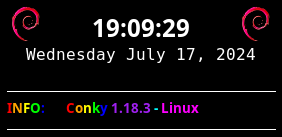
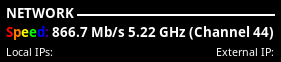
Pour avoir des infos sur le réseaux Wifi , speed & channel
${font sans-serif:bold:size=10}${color #FF0000}S${color #FF7F00}p${color #FFFF00}e${color #00FF00}e${color #0000FF}d${color #4B0082}:${color white} ${execi 10 /sbin/iwlist wlp0s20f3 bitrate | grep -w Current | awk '{print $3,$4}' | cut -c 6-} ${exec /sbin/iwlist wlp0s20f3 channel | grep -w Current | awk {'print $2,$3,$4,$5'} | cut -c 11-}
Note:
Le paramètre
${execi 10 /sbin/iwlist wlp0s20f3 bitrate ....
permet d’exécuter la commande toute les 10 second .
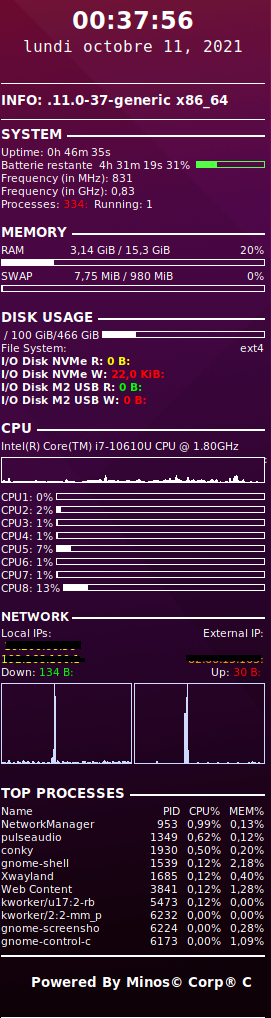
Rendu
Disk by ID
ASTUCE DISK by ID:
Pour ceux qui veulent des disk spécifiques ou des partitions, utiliser cette commande.
ll /dev/disk/by-id
tutaux/linux/conky.txt · Dernière modification : de sylvain