
Table des matières

Filtrage les réseaux 3, 4 ou 5G Opérateurs
Avant de vous lancer
Pour se faire il vous faut :
- Un nom de domaine
- Une ip fixe
Modifications Docker
Si vous avez suivi ce tutau Déployer le conteneur AdGuard, cest parfait !!
Il ne vous restera plus qu'a créer un volume docker ou seront stocké vos certificats !
docker volume create Adguard_certs
C'est ici que seront créer vos certificats avant d'être copié dans le dossier Adguard_conf
Nom de domaine OVH
Il vous faut posséder un nom de domaine, ici j'utilise OVH ! Souveraineté oblige 
Étape 1 : Accéder à la zone DNS OVH
- Allez dans Web Cloud > Noms de domaine > Votre domaine
- Cliquez sur Zone DNS
Étape 2 : réer l'enregistrement DNS
- Cliquez sur Ajouter une entrée
- Choisissez A (ou AAAA pour IPv6)
- Sous-domaine : dns (ou adguard) au choix
- Cible : Votre IP publique fixe (ip stack)
- TTL : 300 (5 minutes)
Résultat : dns.votre-domaine.com pointera vers votre IP
Configuration du routeur/box
Créer un NAT, pour rediriger les flux entrant venant du port 853 vers votre docker ou tourne votre AdGuard.
Port 853 (DoT) → IP_locale_docker:853
API Keys
Pour obtenir les clés API OVH :
Allez sur https://eu.api.ovh.com/createToken/
Droits nécessaires :
Une fois authentifié avec vos accès chez OVH, il vous faudra compléter les champs suivant :
GET /domain/zone/*
POST /domain/zone/*
DELETE /domain/zone/*
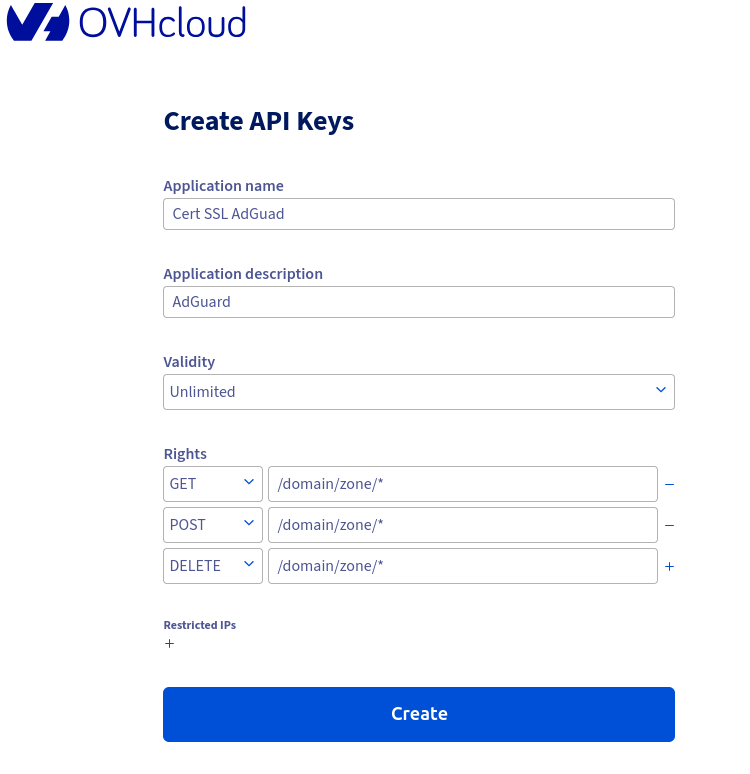
Une fois validé, vous devriez avoir quelque chose de similaire :
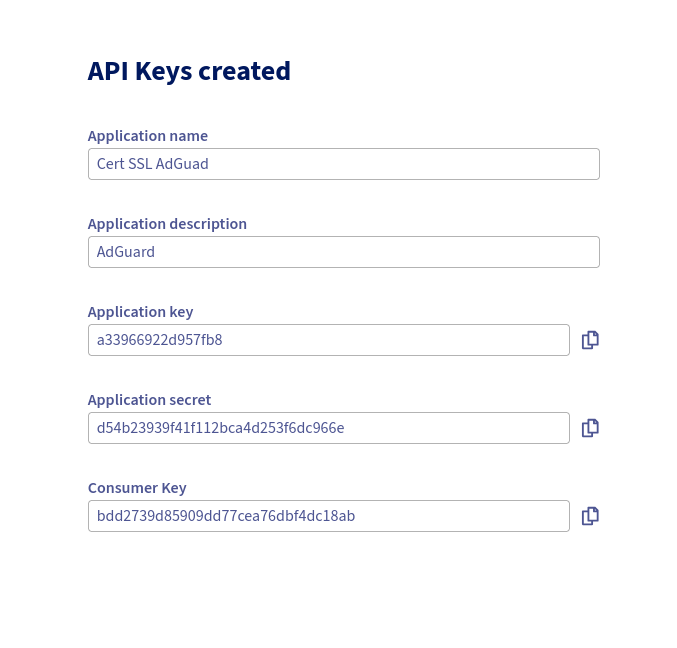
Conserver bien vos Clé et secret
LES CLÉ ET SECRETS GÉNÉRÉ ICI SONT FACTICE !!
Script de création
Solution : Défi DNS (Recommandée)
Cette méthode n'utilise pas le port 80 du tout, elle passe par les enregistrements DNS.
Avec le plugin OVH DNS, donc pas besoin de faire du NAT sur le port 80 à destination de votre serveur Docker.
le Script
# Script utilisant le défi DNS OVH
#!/bin/bash
# scripts/init-cert-dns.sh

DOMAIN="dns.mon-domaine.fr"
EMAIL="votre-email@example.com"

echo "=== Configuration des credentials OVH ==="
# Créer le fichier de credentials (une seule fois à l'init)
cat > ~/ovh.ini << EOF
dns_ovh_endpoint = ovh-eu
dns_ovh_application_key = YOUR_APPLICATION_KEY
dns_ovh_application_secret = YOUR_APPLICATION_SECRET
dns_ovh_consumer_key = YOUR_CONSUMER_KEY
EOF
chmod 600 ~/ovh.ini

echo "=== Génération du certificat avec DNS Challenge ==="
docker run --rm \
  -v Adguard_certs:/etc/letsencrypt \
  -v ~/ovh.ini:/ovh.ini:ro \
  certbot/dns-ovh certonly \
  --dns-ovh \
  --dns-ovh-credentials /ovh.ini \
  --email $EMAIL \
  --agree-tos \
  --no-eff-email \
  -d $DOMAIN

if [ $? -eq 0 ]; then
    echo "=== Copie des certificats ==="
    docker run --rm \
      -v Adguard_certs:/certs \
      -v Adguard_conf:/conf \
      ubuntu:latest bash -c "
        cp /certs/live/$DOMAIN/fullchain.pem /conf/
        cp /certs/live/$DOMAIN/privkey.pem /conf/
        chown -R 1000:1000 /conf/*.pem
      "
    echo "Certificat généré avec DNS challenge !"
fi
Il ne vous restera plus qu'a activer le droit d’exécution de votre script puis l'exécuter :
chmod +x init-cert-dns.sh
./init-cert-dns.sh
Saving debug log to /var/log/letsencrypt/letsencrypt.log
Requesting a certificate for dns.mondomaine.fr
Waiting 120 seconds for DNS changes to propagate

Successfully received certificate.
Certificate is saved at: /etc/letsencrypt/live/dns.mondomaine.fr/fullchain.pem
Key is saved at:         /etc/letsencrypt/live/dns.momdomaine.fr/privkey.pem
This certificate expires on 2026-05-01.
These files will be updated when the certificate renews.
NEXT STEPS:
- The certificate will need to be renewed before it expires. Certbot can automatically renew the certificate in the background, but you may need to take steps to enable that functionality. See https://certbot.org/renewal-setup for instructions.

- - - - - - - - - - - - - - - - - - - - - - - - - - - - - - - - - - - - - - - -
If you like Certbot, please consider supporting our work by:
 * Donating to ISRG / Let's Encrypt:   https://letsencrypt.org/donate
 * Donating to EFF:                    https://eff.org/donate-le
- - - - - - - - - - - - - - - - - - - - - - - - - - - - - - - - - - - - - - - -
=== Copie des certificats ===
Certificat généré avec DNS challenge !
Contrôle
ll /var/lib/docker/volumes/Adguard_conf/_data/
-rw------- 1 root root 15013 Jan 31 15:56 AdGuardHome.yaml
-rw-r--r-- 1 pi   pi    2868 Jan 31 15:56 fullchain.pem
-rw------- 1 pi   pi     241 Jan 31 15:56 privkey.pem
Script de renew cert
nano scripts/renew-cert-dns.sh
#!/bin/bash

DOMAIN="dns.modomaine.fr"
LOG_FILE="$HOME/adguard-ssl/logs/renew.log"
OVH_INI="$HOME/ovh.ini"

# Créer le répertoire de logs si inexistant
mkdir -p $(dirname $LOG_FILE)

echo "=== $(date) : Début du renouvellement DNS Challenge ===" >> $LOG_FILE

echo "Tentative de renouvellement du certificat..." >> $LOG_FILE

# Renouvellement avec DNS Challenge (pas besoin d'arrêter AdGuard)
docker run --rm \
  -v Adguard_certs:/etc/letsencrypt \
  -v $OVH_INI:/ovh.ini:ro \
  certbot/dns-ovh renew \
  --dns-ovh \
  --dns-ovh-credentials /ovh.ini \
  --quiet >> $LOG_FILE 2>&1

if [ $? -eq 0 ]; then
    echo "✅ Certificat renouvelé avec succès" >> $LOG_FILE

    # Copie des nouveaux certificats
    echo "Copie des certificats vers AdGuard..." >> $LOG_FILE
    docker run --rm \
      -v Adguard_certs:/certs \
      -v Adguard_conf:/conf \
      ubuntu:latest bash -c "
        if [ -f /certs/live/$DOMAIN/fullchain.pem ]; then
            cp /certs/live/$DOMAIN/fullchain.pem /conf/
            cp /certs/live/$DOMAIN/privkey.pem /conf/
            chown -R 1000:1000 /conf/*.pem
            echo 'Certificats copiés avec succès'
        fi
      " >> $LOG_FILE 2>&1

    # Redémarrage d'AdGuard pour prendre en compte les nouveaux certificats
    echo "Redémarrage d'AdGuard..." >> $LOG_FILE
    docker restart adguardhome

    # Vérification
    sleep 10
    if [ $(docker inspect -f '{{.State.Running}}' adguardhome) == "true" ]; then
        echo "✅ AdGuard redémarré avec succès" >> $LOG_FILE
    else
        echo "❌ ERREUR: AdGuard n'a pas pu redémarrer" >> $LOG_FILE
    fi

else
    echo "⚠️  Aucun certificat à renouveler ou erreur" >> $LOG_FILE
fi

echo "=== $(date) : Fin du renouvellement ===" >> $LOG_FILE
echo "" >> $LOG_FILE

# Garder seulement les 100 dernières lignes du log
tail -n 100 $LOG_FILE > ${LOG_FILE}.tmp && mv ${LOG_FILE}.tmp $LOG_FILE
chmod +x scripts/renew-cert-dns.sh
Cron
Il ne vous restera plus qu'a ajouter une entrée cron tab :
# Éditer le crontab
crontab -e

# Ajouter cette ligne (renouvellement tous les 3 mois le 1er à 3h du matin)
0 3 1 */3 * cd /path/du/script/renew-cert-dns.sh
Conf AdGuard
Configuration AdGuard Home
Accéder à l'interface
- URL : http://IP_DU_SERVEUR:80
Dans Paramètres > Chiffrement :
- Activer le chiffrement (HTTPS, DNS-over-HTTPS, et DNS-over-TLS)
- Nom du serveur : dns.mondomaine.fr
- Port HTTPS/DNS-over-HTTPS : 443
- Port DNS-over-TLS : 853
- Certificat : /opt/adguardhome/conf/fullchain.pem
- Clé privée : /opt/adguardhome/conf/privkey.pem
☑ Forcer HTTPS
☑ Servir un certificat de confiance
Conf Smartphone
Android :
- Paramètres > Connexions > Plus de paramètres de connexion > DNS privé
- Sélectionner : “Nom d'hôte du fournisseur DNS privé”
- Entrer : dns.mondomaine.fr
iOS :
- Paramètres > Général > VPN et gestion d'appareils > DNS
- Configurer un DNS > Manuel
- Serveurs DNS : IP de dns.mondomaine.fr
Pour les apps supportant DoH/DoT :
DNS-over-HTTPS : https://dns.mondomaine.fr/dns-query
DNS-over-TLS : dns.mondomaine.fr
Test DoT/DoH
dig @dns.mondomaine.fr +tls google.com
; <<>> DiG 9.18.39-0ubuntu0.24.04.2-Ubuntu <<>> @dns.mondomaine.fr +tls google.com
; (1 server found)
;; global options: +cmd
;; Got answer:
;; ->>HEADER<<- opcode: QUERY, status: NOERROR, id: 56976
;; flags: qr rd ra; QUERY: 1, ANSWER: 1, AUTHORITY: 0, ADDITIONAL: 1

;; OPT PSEUDOSECTION:
; EDNS: version: 0, flags:; udp: 1232
;; QUESTION SECTION:
;google.com.			IN	A

;; ANSWER SECTION:
google.com.		191	IN	A	172.217.18.206

;; Query time: 311 msec
;; SERVER: 89.112.1XX.1XX#853(dns.mondomaine.fr) (TLS)
;; WHEN: Sat Jan 31 17:05:25 CET 2026
;; MSG SIZE  rcvd: 55