Table des matières

Purger sa MEMOIRE sous LINUX
Il existe trois méthode, ou du moins 3 niveaux:
Effacez PageCache uniquement
sync; echo 1 > /proc/sys/vm/drop_caches
Effacer les entrées et les inodes
sync; echo 2 > /proc/sys/vm/drop_caches
Effacez PageCache, les entrées et les inodes
sync; echo 3 > /proc/sys/vm/drop_caches
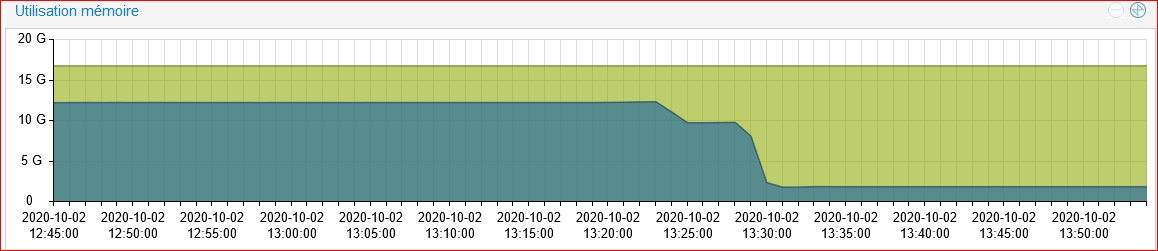 La réponse est sans appel effet immédiat.
Script Shell
#!/bin/bash
# Note, we are using "echo 3", but it is not recommended in production instead use "echo 1"
echo "echo 2 > /proc/sys/vm/drop_caches"
# chmod 755 clearcache.sh
# crontab -e
0 2 * * * /path/to/clearcache.sh
Permet de s'exécuter tout les jours à 2h00
Purge du SWAP
# swapoff -a && swapon -a
Purge de la RAM
free -h && sysctl vm.drop_caches=3 && free -h
root@pc:/home/sylvain# free -h && sysctl vm.drop_caches=3 && free -h
               total       utilisé      libre     partagé tamp/cache   disponible
Mem:            15Gi       2,7Gi       5,4Gi       505Mi       7,2Gi        11Gi
Partition d'échange:      979Mi          0B       979Mi
vm.drop_caches = 3
               total       utilisé      libre     partagé tamp/cache   disponible
Mem:            15Gi       2,7Gi        11Gi       439Mi       1,0Gi        11Gi
Partition d'échange:      979Mi          0B       979Mi